How do I connect to/start selling on Amazon? (customized steps)
Getting Started
Before you begin, please email support@bibliopolis.com with your interest in purchasing the Amazon BookRouter Plus option. The service is $15/month with no setup fees.
When you have received confirmation that the service has been enabled, click continue below.
If you have already signed up for the eBay BookRouter Plus service (or are interested in doing so), please note that Amazon is included in the $50/month eBay fee.
Bibliopolis supports Amazon North America (US, CA, MX) and EU (UK, DE, IT, FR, ES). Each seller account and each marketplace must be integrated separately. We do not support Amazon JP, CN, IN or AU.
Are you on Amazon's Professional Selling plan?
You need an Amazon Professional Selling plan to connect BookRouter to your account.
1. Go to the Amazon Marketplace Web Service (MWS) site specific to your country
3. Fill out each step to get your Amazon Seller Central account setup.
You should receive confirmation that your account is set up.
Did you setup developer access?
You will need to authorize Bibliopolis in your Amazon account before you can connect.
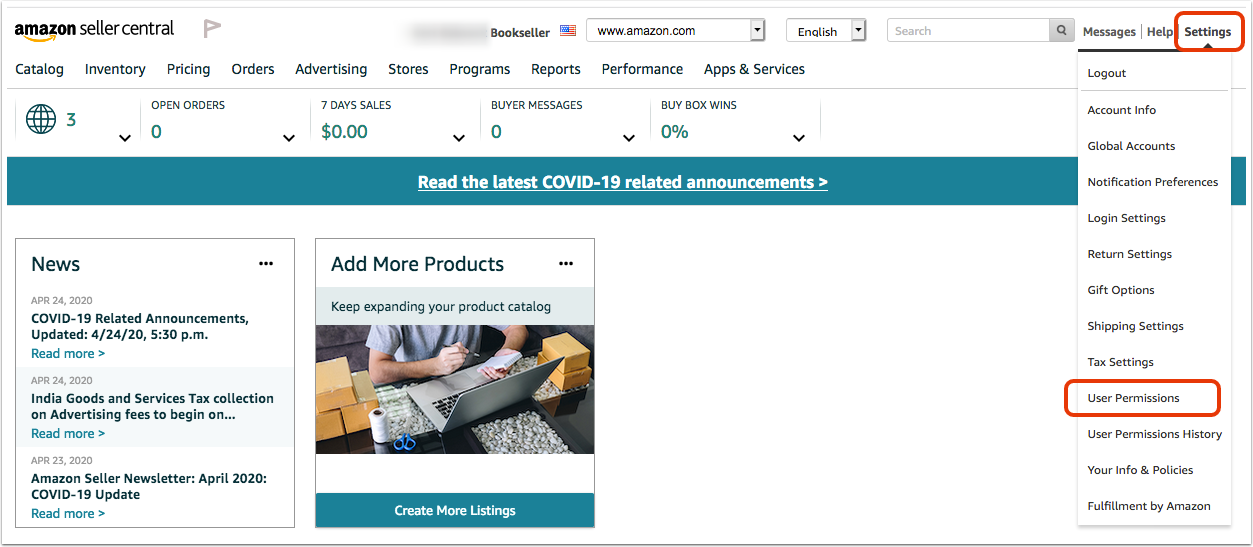
1. Login to your Amazon Seller Central account. Go to 'Settings' in the top right corner and select 'User Permissions' from the drop down menu.
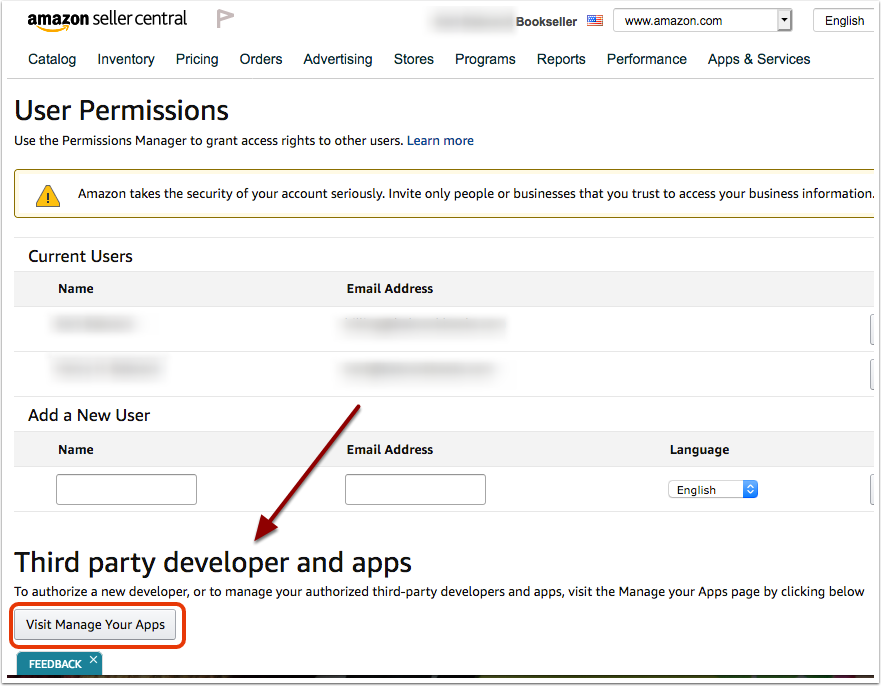
2. Scroll down to the 'Third party developer and apps' section and click 'Visit Manage Your Apps.'
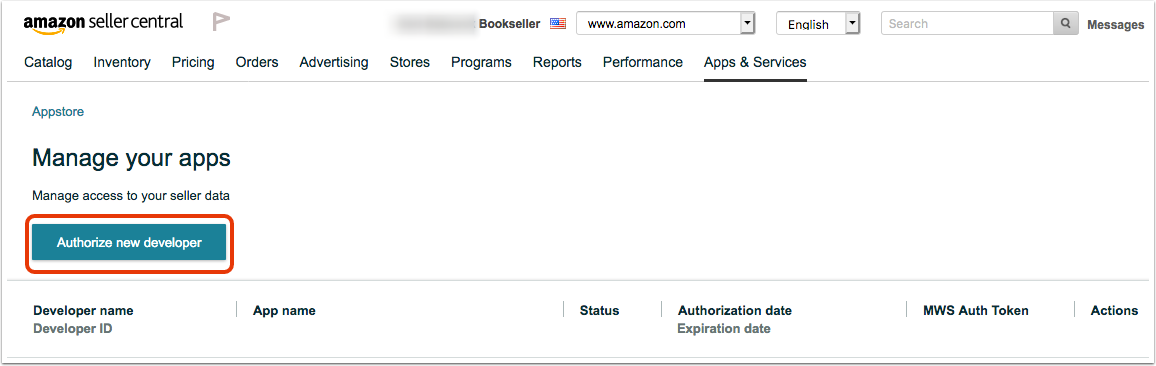
3. Click the button 'Authorize new developer.'
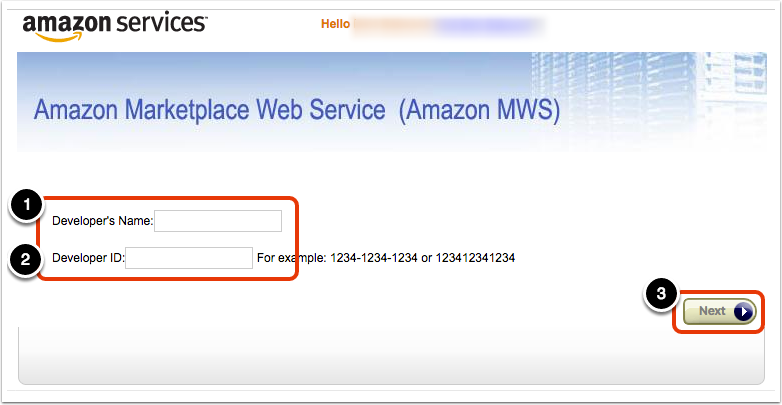
4. Enter the name and account number, depending on your region. Then, click the 'Next' button.
If you are a North American seller (US, CA, MX):
Enter the 'Developer's Name' as Bibliopolis-NA and the 'Developer ID' as 5549-6721-4163.
If you are a European seller (UK, DE, FR, IT, ES):
Enter the 'Developer's Name' as Bibliopolis-EU and the 'Developer ID' as 3007-8549-0646.
5. Review and accept the Amazon MWS License Agreement. Then, click the 'Next' button.
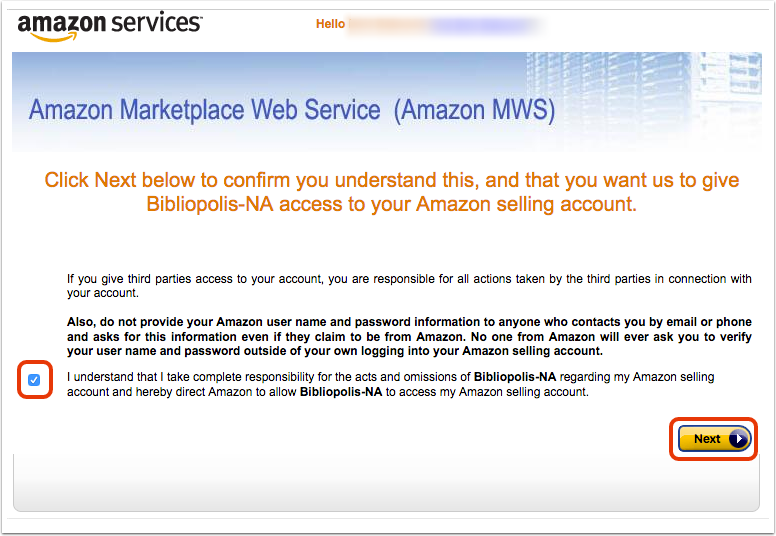
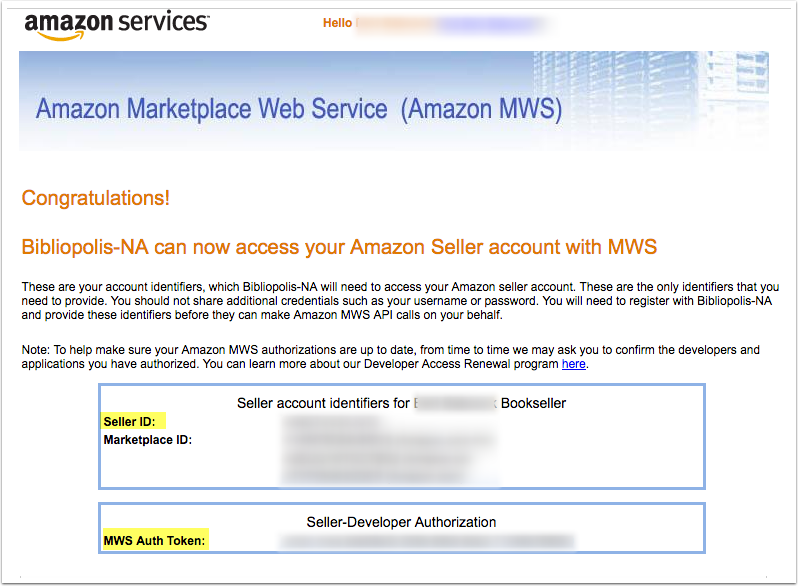
6. Make note of your Merchant Token (Seller ID) and MWS Auth Token, you will need them in the next step.
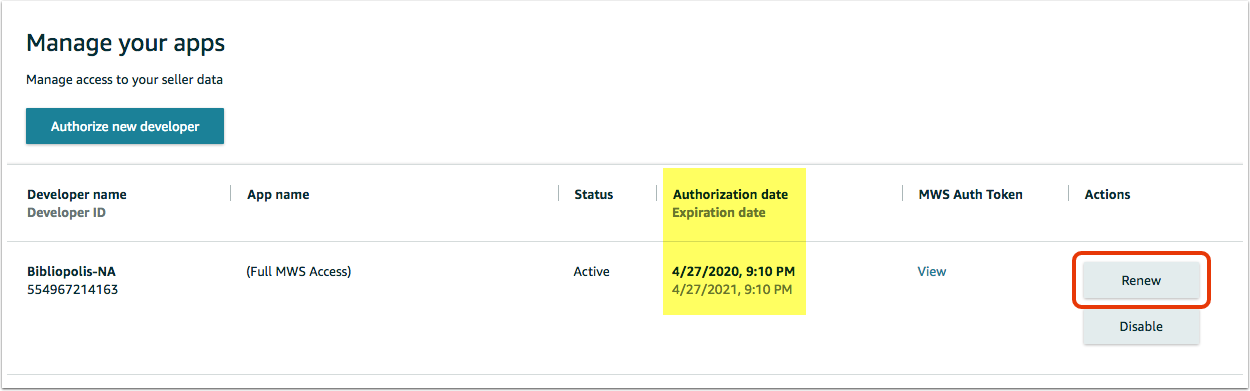
Please note that you will need to renew your authorization annually. You can do this at any time from the 'Manage your apps' page (follow step 1 above).
Do you have your Merchant Token (Seller ID) and MWS Auth Token?
You will need these to connect BookRouter to your Amazon account in the next step.
Please make note of both your Merchant Token (Seller ID) and MWS Auth Token. You will need them to connect BookRouter to your Amazon account in the next step.
To find your Merchant Token (Seller ID)
1. Login to your Amazon Seller Central account. Go to 'Settings' in the top right corner and select 'Account Info' from the drop down.
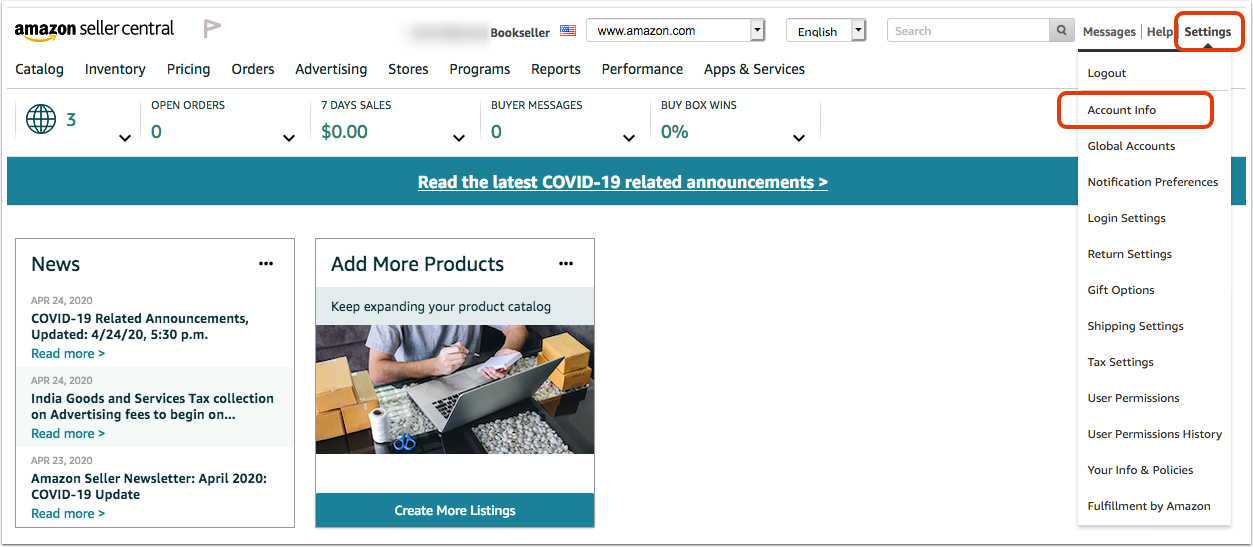
2. In the 'Business Information' section, click on 'Merchant Token.'
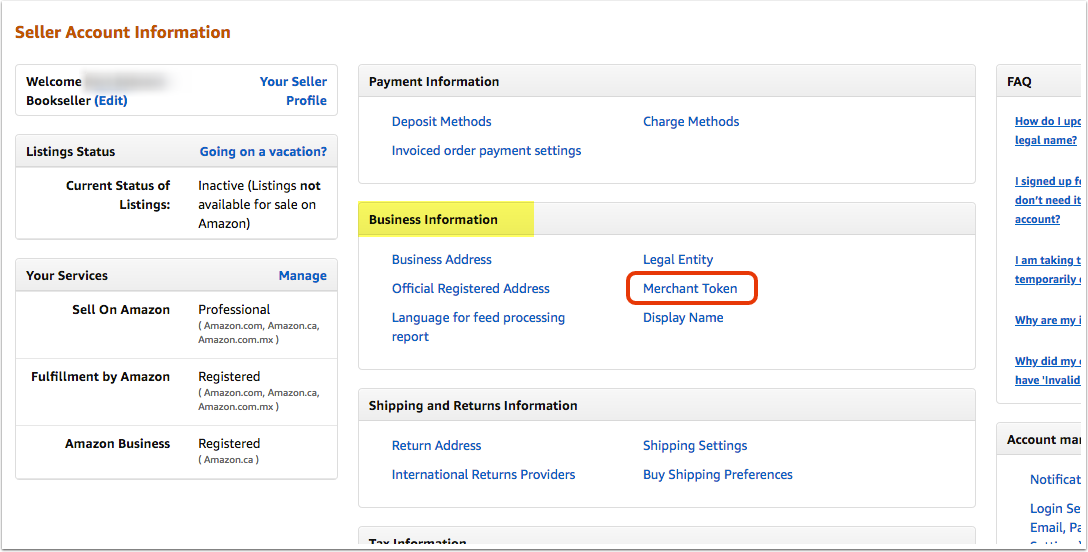
To find your MWS Auth Token
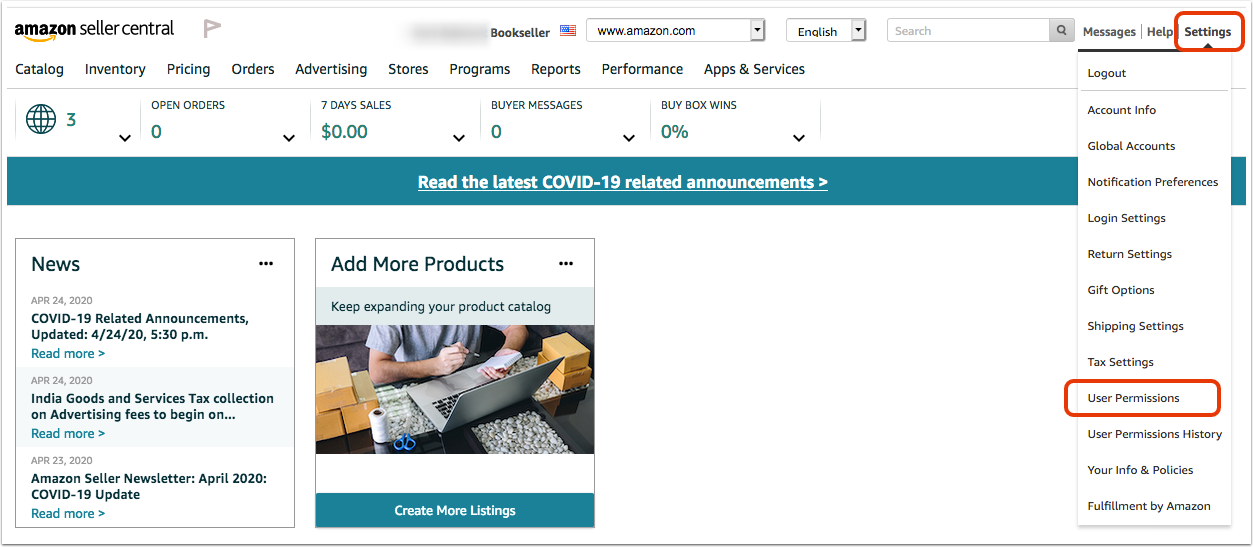
1. Login to your Amazon Seller Central account. Go to 'Settings' in the top right corner and select 'User Permissions' from the drop down menu.
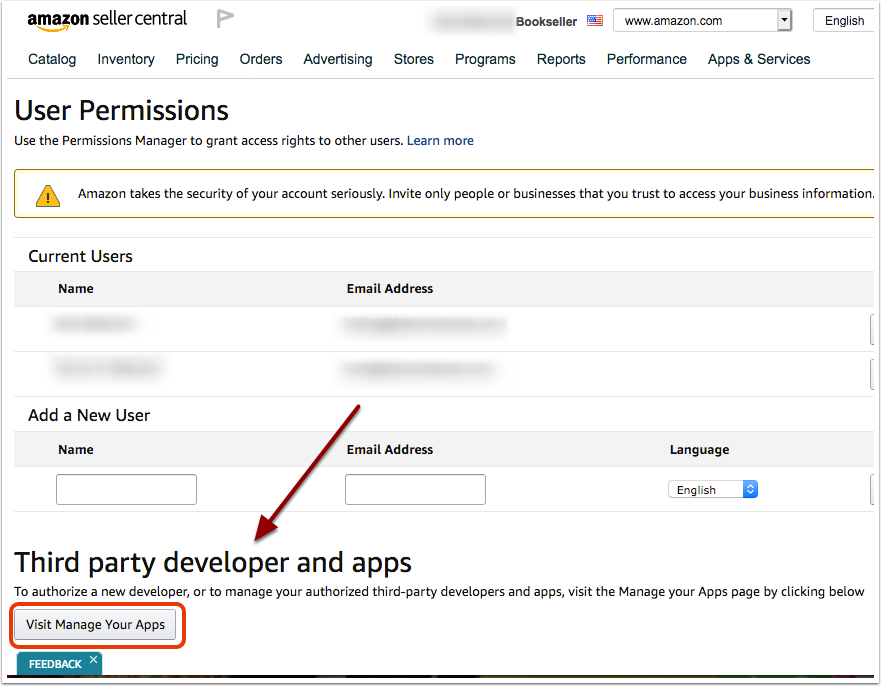
2. Scroll down to the 'Third party developer and apps' section and click 'Visit Manage Your Apps.'
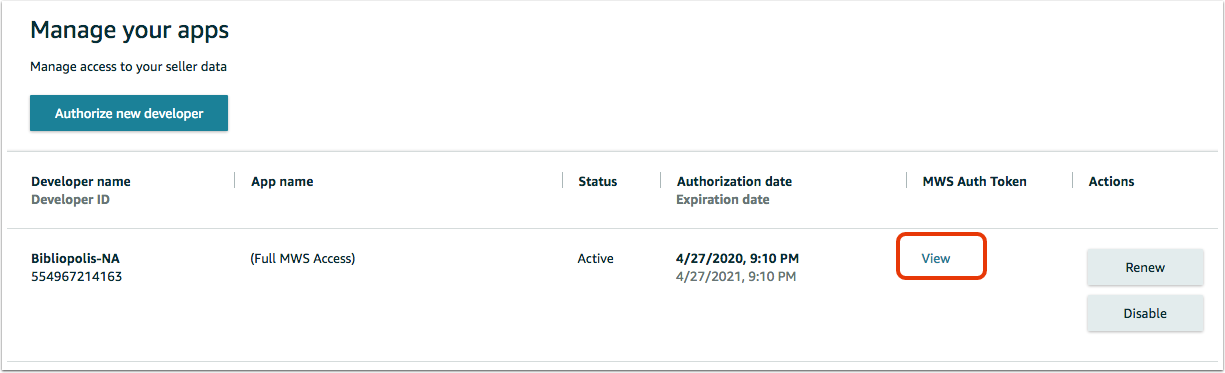
3. Find the Bibliopolis-NA account (or Bibliopolis-EU if you are a European seller). Click the 'View' link under the 'MWS Auth Token' column.
Connect & Configure Settings
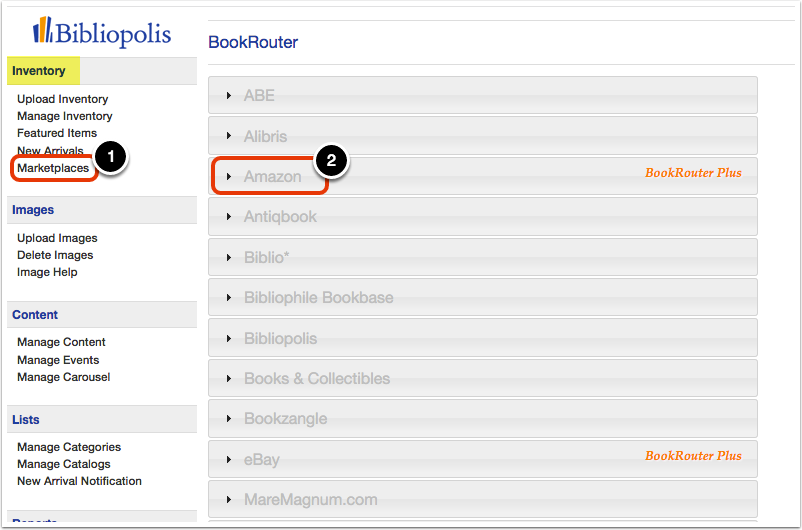
1. Login in to your Admin/Control Panel. Click on 'Marketplaces' under the 'Inventory' heading on the Control Panel menu. Then, click on 'Amazon.'
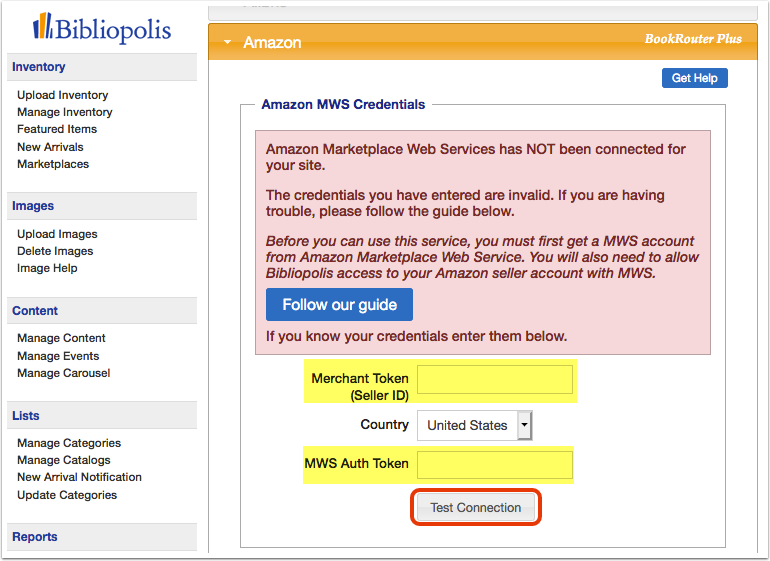
2. Enter your 'Merchant Token (Seller ID)' and 'MWS Auth Token.' Then, click the 'Test Connection' button.
3. Upon successful connection, you will see a message in a green box indicating your account is now connected.
If there is an issue with the connection, please double-check that you have entered the correct Merchant Token (Seller ID) and MWS Auth Token. If you still have trouble connecting, please email support@bibliopolis.com.
4. Configure the following settings to complete your setup, then click 'Save Changes.'
- Listing Status. Set this to 'Active' when you are ready for BookRouter to begin sending books to Amazon.
- List Items as Collectible? Amazon has a separate Collectible category for rare books. You must be approved to sell in Collectible categories and if not approved, the upload will fail. If you are not approved or do not know, we recommend setting this to 'Never.' When the 'Let BookRouter decide' option is set, BookRouter will determine whether a book should be marked collectible based on some basic factors. Generally, books marked as signed or first editions, or priced $200 or greater will be marked as collectible.
- Condition Default. BookRouter tries to match all items' condition to appropriate Amazon condition values, but when it cannot, this should be the default.
- Specify if you offer international shipping, expedited shipping, or standard plus shipping.
- Do you need to link to a custom Shipping Template? Only check this box if you have configured a custom shipping template in your Amazon Seller Central account. If you have, then check the box and enter the name of your shipping template exactly as it appears in your Amazon account.
- Pricing. Update your re-pricing preferences, if desired.
- Update All? Setting this to 'Yes' and saving will tell BookRouter to submit an update of ALL items. This might be necessary if a revision is made to pricing options. For instance, if a Re-price setting is altered, then all items would need to be revised.
- Wait. If you want to delay newly listed items to the website from getting uploaded to Amazon, enter the number in 'days' that you wish to delay uploads.