How do I create a new shipping method/shipping rate?
Shipping is separated into two parts: Shipping Zones and Shipping Methods.
- Shipping zones are regions set up based on country. By default, there are three shipping zones: US (Domestic), Canada & Mexico, and International. These can be customized to provide you with more precise shipping zones, such as a custom zone for Europe or Asia.
- Shipping methods are specific shipping rates tied to a particular shipping zone.
Customer Pays Shipping
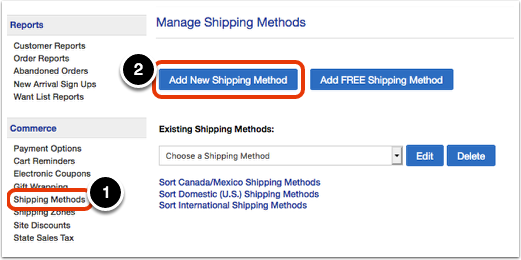
Click on the 'Shipping Methods' link under the 'Commerce' heading in the Control Panel menu. Then, click on the 'Add New Shipping Method' button.
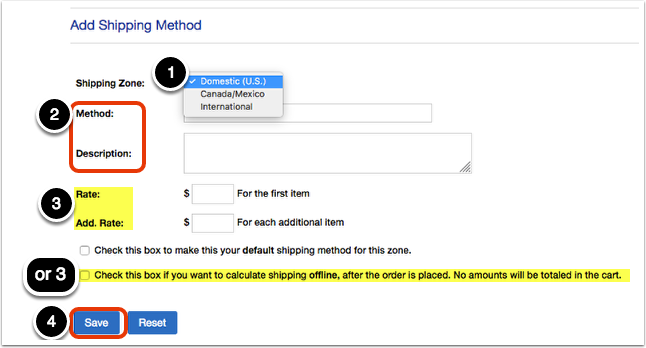
Enter the details of your new shipping method. First, select a shipping zone that this method should apply to. Then, specify the method and add a description (both will be displayed to the customer).
There are two options for shipping rates:
1. You can enter a flat rate for the first item and each additional item.
2. You can check the shipping offline box to calculate shipping after an order has been placed.
When you are finished entering details, click 'Save.'
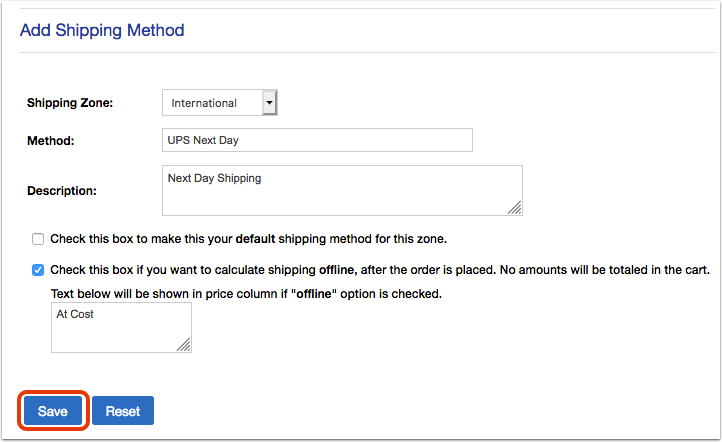
If you select offline shipping , you will be presented with a text box to enter text that displays in the price column during checkout. We suggest something short such as "At Cost". You can provide further details in the 'Description' box.
When you are finished entering details, click 'Save.'
Free Shipping
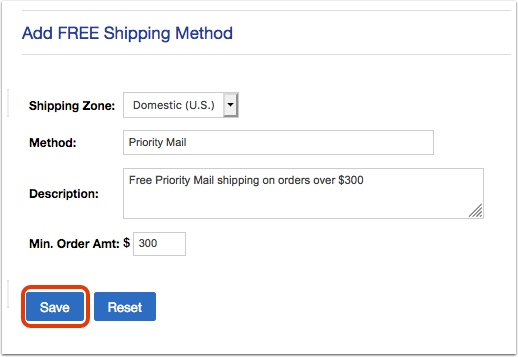
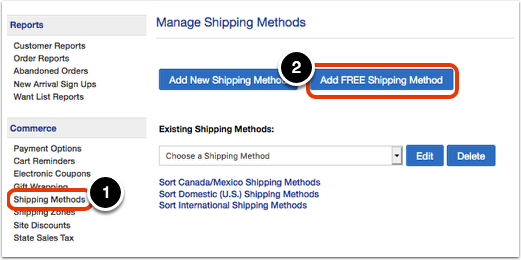
Click on the 'Shipping Methods' link under the 'Commerce' heading in the Control Panel menu. Then, click on the 'Add FREE Shipping Method' button.
Select a shipping zone that this method should apply to. Then, add the method, description, and minimum order amount. When you are finished, click 'Save.'